Mine with CUDA on supported NVIDIA GPUs. Automatic prefers CUDA, then falls back to OpenCL when a compatible OpenCL GPU is available. Your CPU and GPU usage limits remain in effect.
Open Mine → Settings and choose Automatic (CUDA preferred), CUDA, or OpenCL. Selecting an unavailable backend shows an error. Mining requires a supported CUDA or OpenCL GPU.
Install a compatible NVIDIA driver
CUDA mining needs a compatible GeForce Game Ready or Studio Driver already installed. The app includes its CUDA compiler libraries, so a separate CUDA Toolkit installation is unnecessary. After a driver update, restart Wartnode.
Allow time for the first start
The first CUDA start calibrates CPU, GPU, transfers, and mining settings. It took about 90 seconds on the release test PC; timing varies. Later starts reuse the saved profile while the hardware, driver, compiler, threads, and GPU limit match.
On one Ryzen 7 5800X / RTX 4060 PC at 60% CPU and GPU limits, CUDA measured 7.0% faster in paired offline runs and 12.7% faster with local synthetic work than v0.6.0-beta.2 OpenCL. These hash-rate tests did not measure real shares, blocks, or payouts. Performance varies by hardware and driver.
LOCAL KEYS · WALLET CONTROLS
Your address. Your key.
Reveal and copy the private key for an address you own, after confirming your profile password. Import it into another Warthog wallet that accepts private keys, including keys for saved vanity addresses.
Open Wallet → My addresses, select an address, and choose Private key. Unlock the profile if needed, then confirm its password to reveal that address’s key.
Copy and check
Copy the 64-character hexadecimal key into a compatible wallet. Verify the imported address matches the original. Both wallets can then control the same address.
Keep your profile backup
Anyone with a private key can spend that address’s funds. It does not recreate recovery words or include labels, contacts, payment records, or unfinished vanity searches.
The key display clears when the dialog closes or the profile locks. The current matching clipboard copy clears then or after 60 seconds; clipboard history and copies kept by other apps remain outside the app’s control. The wallet also locks when an RDP session disconnects.
LOCAL CPU & GPU SEARCH · VANITY ADDRESSES
An address with your own pattern.
Choose a hexadecimal prefix, suffix, or both. Search locally with your CPU or a supported OpenCL GPU, without a node connection. Difficulty and an optional speed measurement help you estimate the average search time.
Open Wallet → My addresses → Vanity address. Use 0–9 and a–f for a prefix, suffix, or both. Each extra character usually means 16 times more work; time estimates cannot promise a finish time.
Pause and resume
Closing the dialog pauses the search. Unfinished searches are saved securely in your profile. After restarting the app, choose Resume search to continue.
Save the match and back it up
Select Save to wallet before using the new address, then make a new encrypted profile backup. Vanity addresses have no recovery words; recovery depends on your profile backup.
Stop mining before measuring search speed or searching for more than eight combined prefix and suffix characters. Mining cannot start while either of these operations is running.
A LOOK INSIDE
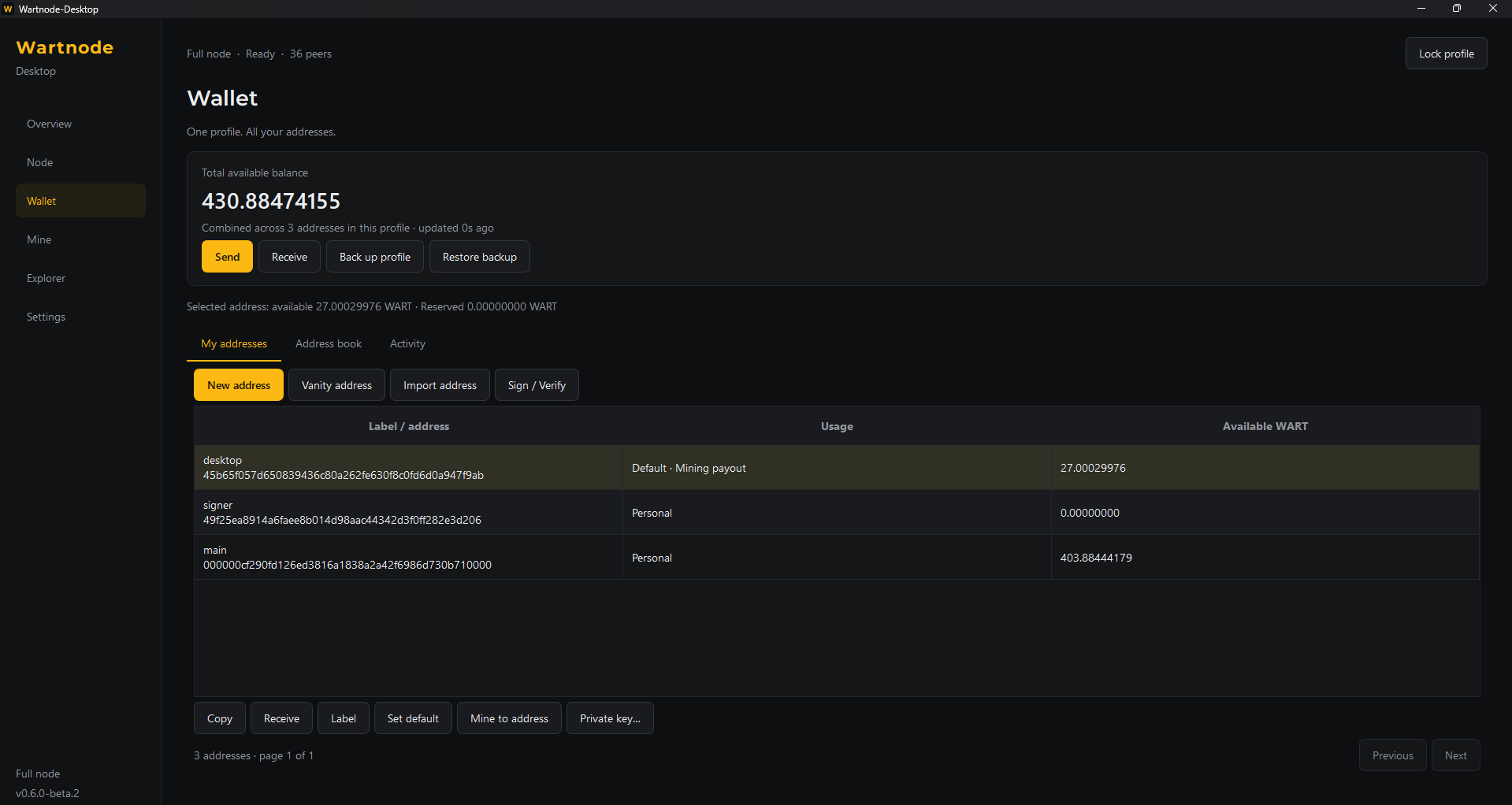
WalletManage labeled addresses, encrypted profile backups, and the per-address Private key action.
Wallet shows v0.6.0-beta.2; Vanity shows v0.6.0-beta.1. Other views are from the v0.5.0 betas. Appearance and features may evolve during the beta.
BUILT FOR EVERYDAY WARTHOG
One app. Your whole workflow.
From your first address to your own node, with the tools to see what’s happening.
01
A wallet that keeps you organized
Send and receive WART, manage labeled addresses under one profile password, save contacts, and make encrypted profile backups. Create vanity addresses, export individual private keys, and sign messages or files locally.
Run and validate the Warthog blockchain locally. Choose your storage folder, follow synchronization, and monitor peers, memory, and connection status.
03
Solo mining, with useful controls
Mine with your CPU and GPU together using Automatic (CUDA preferred), CUDA, or OpenCL. Choose Eco, Balanced, Heavy, or custom limits, then follow hashrate, supported hardware telemetry, and confirmed rewards.
04
The chain, a little closer
Browse recent blocks or search by block height, block hash, transaction, or address. Jump from the app to wartnode.com for more detail.
CHOOSE YOUR CONNECTION
Start light. Or run the chain.
Your wallet keys and signing stay local in both modes. You choose when to start a node or miner.
NO BLOCKCHAIN DOWNLOAD
Lite wallet
Connect to Wartnode’s hosted mainnet node for wallet and explorer data, without storing the blockchain.
Local keys and transaction signing
Wallet and explorer access
Relies on hosted chain data; does not independently validate the chain or support solo mining.VERIFY LOCALLY · ENABLE MINING
Full node
Store and validate the blockchain on your computer, with a managed local node and optional solo mining.
Local blockchain validation
Solo mining with a supported CPU + GPU
Requires disk space for the growing blockchain. Mining also requires a supported CUDA or OpenCL GPU and a compatible graphics driver.
TRY THE PUBLIC BETA
Make yourself at home.
Windows 11 x64, build 22000 or newer, and an internet connection. Choose the installer or extract the complete portable package. No Python, Git, or Docker required. Use the installer when upgrading an existing profile.
Before upgrading, make an encrypted profile backup in the old app and keep it, with its password, separately from future backups. Exit the app completely, then run the new installer.
This release keeps the same profile and backup formats as the v0.6.0 betas. No wallet migration or blockchain resync is planned. The installer refuses a downgrade to an older version. Keep your pre-upgrade backup separately and read the release notes before attempting recovery or rollback.
Coming from a v0.5.0 beta?
Supported shared-password profiles migrate automatically when opened. Addresses, contacts, and payment records are retained; no wallet transfer or blockchain resync is required. Check your wallet and make a new backup after upgrading.
Versions older than v0.6 cannot open the migrated profile or restore its new backups. Returning to a v0.5.0 beta requires your pre-upgrade backup in a separate compatible installation and a fresh empty profile. Keep the newer profile intact: the old backup cannot recover addresses or records created afterward.
CUDA qualification and performance measurements used an RTX 4060. Broader GPU and driver coverage and the 72-hour soak remain pending for this beta. A compatible graphics driver must already be installed; the installer includes no NVIDIA display driver or firmware. Updates are installed manually from GitHub.